A production-first guide for Kubernetes engineers who need answers fast.
INTRODUCTION
When a Node Goes Quiet
It is 11:40 PM and your phone buzzes. PagerDuty: 47 pods evicted from worker-node-04 in the us-east-1a production cluster. You pull up kubectl and see a status you never want to see on a production node:
# kubectl get nodes
NAME             STATUS     ROLES    AGE    VERSION
worker-node-01   Ready      <none>   42d    v1.29.3
worker-node-02   Ready      <none>   42d    v1.29.3
worker-node-03   Ready      <none>   42d    v1.29.3
worker-node-04   NotReady   <none>   42d    v1.29.3
NotReady is Kubernetes telling you: the kubelet on this node stopped sending heartbeats, and I no longer trust it to run workloads. What happens next is automatic and fast. The node controller starts evicting pods. The scheduler stops placing new workloads on the node. If you are running without adequate headroom on other nodes, your services begin degrading within minutes.
The reason this status is frustrating is that it is not a single error. NotReady is a symptom. Behind it could be a crashed kubelet, an unresponsive container runtime, a full disk, a network partition, or a terminated cloud instance. This guide walks through each cause in depth, with real debugging sessions, exact commands, and the signals that distinguish a quick fix from a deeper infrastructure problem.
How Kubernetes Determines Node Not Ready
Understanding the mechanism behind NotReady makes you a faster debugger. Kubernetes does not directly poll node health from the control plane. It relies entirely on the kubelet process running on each node to self-report its status via periodic heartbeats.
The Heartbeat Mechanism
The kubelet sends two types of heartbeats to the API server. The first is a NodeStatus update, sent every 10 seconds by default, which includes the full node condition set. The second is a Lease object update in the kube-node-lease namespace, updated every 10 seconds and designed to be lightweight for large clusters.
The node controller on the control plane watches these signals. If no heartbeat arrives within the node-monitor-grace-period (default: 40 seconds), the node controller sets the node’s Ready condition to Unknown. After the pod-eviction-timeout (default: 5 minutes in most distributions), it begins evicting pods and marking them for rescheduling.
| Key timing to internalize: Heartbeat interval: 10 seconds (kubelet default) node-monitor-grace-period: 40 seconds (before Unknown is set) pod-eviction-timeout: 5 minutes (before pod eviction begins) Full cascade from crash to eviction: ~5 minutes 40 seconds |
Node Conditions You Need to Know
kubectl describe node surfaces five conditions. Each one maps to a specific subsystem on the node and tells you where to look first:
| Condition | Normal Value | What It Monitors |
|---|---|---|
| Ready | True | Overall node health — kubelet running, runtime ok, disk ok |
| MemoryPressure | False | Available memory vs. kubelet eviction threshold |
| DiskPressure | False | Available disk on root fs and container runtime fs |
| PIDPressure | False | Available process IDs vs. configured threshold |
| NetworkUnavailable | False | Set by CNI plugin on successful network configuration |
When Ready flips to False or Unknown, it means either the kubelet explicitly reported a failure, or it stopped reporting entirely. The other four conditions give you directional signal about why. DiskPressure: True alongside NotReady is a very different debugging path than NetworkUnavailable: True.
The Role of the kubelet
The kubelet is the node agent. It handles container lifecycle management, mounts volumes, runs probes, and critically reports node conditions to the API server. If the kubelet process dies, nothing on that node reports to the control plane. From the control plane’s perspective, the node has gone silent, and after 40 seconds it marks it Unknown. That is why kubelet health is always the first thing you check.
ROOT CAUSES
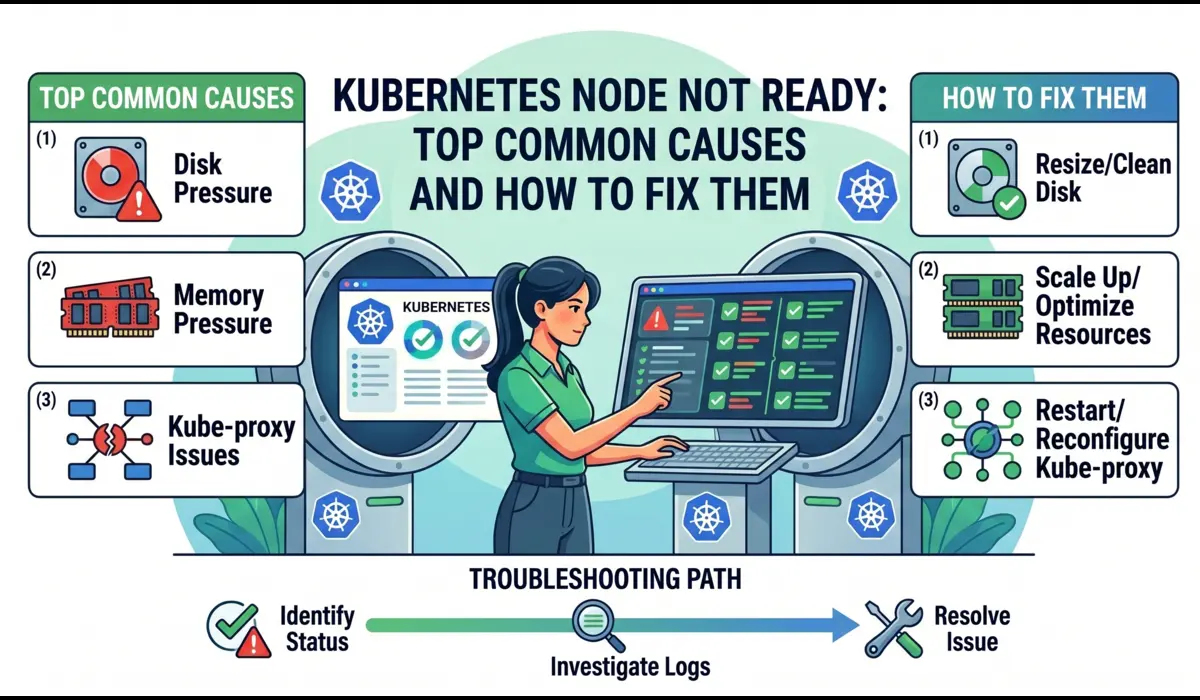
Common Causes of Kubernetes Node Not Ready
Each cause below follows the same structure: what happens internally, what signals you see, how to diagnose it with exact commands, and how to fix it correctly rather than just masking the symptom.
1. Kubelet Not Running or Crashing
What Happens Internally
The kubelet runs as a systemd service on most Kubernetes distributions (kubeadm-provisioned clusters, EKS worker nodes, GKE nodes in some configurations). If systemd cannot start it, if the kubelet binary panics, or if its configuration file is malformed, the process exits. With no kubelet running, no heartbeats reach the API server, and the node transitions to Unknown after 40 seconds.
Symptoms
- kubectl get nodes shows NotReady or Unknown
- Other node conditions may show as Unknown (no data to evaluate them)
- kubectl describe node shows the last heartbeat time was several minutes ago
- No new pods are being scheduled onto the node
How to Diagnose
SSH into the node and check the kubelet service status immediately. Do not run kubectl from outside first — you already know it is NotReady. Go straight to the source:
# Check if kubelet is running and get its last exit reason
$ systemctl status kubelet
# Expected output when kubelet is crashed:
kubelet.service - Kubernetes Kubelet
Loaded: loaded (/lib/systemd/system/kubelet.service; enabled)
Active: failed (Result: exit-code) since Mon 2025-04-21 23:38:14 UTC
Process: ExecStart=/usr/bin/kubelet $KUBELET_ARGS (code=exited, status=1)
Main PID: 4821 (code=exited, status=1)In one incident on a kubeadm cluster after a node OS patch, the kubelet failed with this:
# Pull the last 200 lines of kubelet journal — this is where the root cause lives
$ journalctl -u kubelet -n 200 --no-pager
# Or follow live to watch it crash in real time
$ journalctl -u kubelet -fIn one incident on a kubeadm cluster after a node OS patch, the kubelet failed with this:
Apr 21 23:38:12 worker-node-04 kubelet[4821]: E0421 23:38:12 kubelet.go:1412]
  Failed to start ContainerManager failed to initialize top level QOS containers:
  failed to update top level Burstable QOS cgroup : failed to set supported cgroup subsystems
  for cgroup [/burstable]: failed to write '': open
  /sys/fs/cgroup/cpu/burstable/cpu.cfs_period_us: permission denied
That error is not a kubelet bug. The OS upgrade had changed the cgroup v1/v2 configuration and the kubelet was trying to write to a path that no longer existed under the expected hierarchy. The fix required updating the kubelet’s –cgroup-driver flag to match the new system configuration, not restarting it blindly.
How to Fix
If the kubelet is simply stopped with no clear error (service was manually stopped, or a deployment script killed it):
$ systemctl start kubelet
$ systemctl enable kubelet   # ensure it starts on reboot
$ systemctl status kubelet   # verify it came back
If there is a configuration error, fix the underlying config before restarting. Common kubelet config locations:
# kubeadm clusters
/var/lib/kubelet/config.yaml
/etc/kubernetes/kubelet.conf
# EKS managed nodes
/etc/kubernetes/kubelet/kubelet-config.json# Validate config syntax before restarting
$ kubelet --config=/var/lib/kubelet/config.yaml --dry-run 2>&1 | head -20| Do not blindly restart kubelet without reading the logs first.Restarting a kubelet that is crashing on startup due to a config error will just producethe same crash in a restart loop. Read journalctl first. Fix the cause. Then restart. |
2. Container Runtime Failure (containerd / CRI-O)
What Happens Internally
The kubelet communicates with the container runtime through the Container Runtime Interface (CRI). If containerd or CRI-O becomes unresponsive — whether due to a deadlock, an out-of-disk condition on its storage path, or a failed plugin — the kubelet loses its ability to manage containers and explicitly sets the Ready condition to False, with a message like: runtime not ready: rpc error: code = Unavailable.
Symptoms
- kubectl describe node shows: container runtime network not ready or runtime not ready
- systemctl status kubelet is running, but journalctl shows repeated CRI RPC failures
- crictl ps returns: connection refused or context deadline exceeded
How to Diagnose
# Check containerd service status
$ systemctl status containerd
# Pull containerd logs
$ journalctl -u containerd -n 100 --no-pager# Test the CRI socket directly — this is the fastest way to confirm runtime health
$ crictl --runtime-endpoint unix:///run/containerd/containerd.sock info# If crictl hangs or errors: containerd is not responding
# List running containers to test full runtime functionality
$ crictl psIn a GKE cluster incident, containerd was running but crictl ps was hanging indefinitely. journalctl -u containerd revealed:
containerd[1247]: time='2025-04-21T22:14:33Z' level=fatal msg='failed to load plugin
  io.containerd.snapshotter.v1.overlayfs' error='failed to mount overlay: operation
  not permitted'
containerd[1247]: time='2025-04-21T22:14:33Z' level=info msg='containerd stopped'
The overlay filesystem plugin had failed because the underlying disk was mounted with the noexec flag after a storage reattachment during a maintenance window. containerd was restarting every 30 seconds and failing at the same point each time.
How to Fix
# Safe first step: restart containerd (lower risk than rebooting)
$ systemctl restart containerd
$ systemctl status containerd
# After containerd recovers, restart kubelet so it reconnects
$ systemctl restart kubelet# Verify the node comes back from the control plane side
$ kubectl get nodes worker-node-04 --watchIf containerd keeps crashing after restart, it is not a service issue — it is a storage or configuration issue underneath it. Check df -h for the containerd data directory and look for mount flags with cat /proc/mounts.
3. Disk Pressure — the Most Avoidable Incident
What Happens Internally
The kubelet monitors disk utilization on two paths: the root filesystem (/) and the image filesystem (where containerd stores image layers, typically /var/lib/containerd). When either crosses the kubelet’s eviction threshold (default: 85% full for imagefs, 10% free for nodefs), the kubelet sets DiskPressure: True. It then begins evicting pods to reclaim space and eventually marks the node NotReady if pressure is severe enough.
Symptoms
- kubectl describe node shows DiskPressure: True and Ready: False
- Events section shows: Evicted pods with reason: ‘The node was low on resource: ephemeral-storage’
- journalctl -u kubelet shows: eviction manager: pods evicted to reclaim disk storage
How to Diagnose
# Check disk usage across all filesystems
$ df -h
# Find the biggest consumers in containerd storage
$ du -sh /var/lib/containerd/*# Find large log files that went unrotated
$ find /var/log -size +500M -type f 2>/dev/null# Check container log sizes — a single noisy service can fill a node
$ find /var/log/pods -name '*.log' -size +100M 2>/dev/null# From the control plane, check node conditions directly
$ kubectl describe node worker-node-04 | grep -A20 'Conditions:'The most common disk pressure scenario in production is not a misbehaving application — it is accumulated container image layers from old deployments and unrotated pod logs. In one EKS cluster running without imagefs log rotation, a single verbose microservice wrote 4GB of logs in 36 hours and triggered DiskPressure across the node.
How to Fix — Immediate
# Prune unused container images (safe — only removes unreferenced images)
$ crictl rmi --prune

# Remove unused images via containerd directly
$ ctr -n k8s.io images list | grep '<none>' | awk '{print $1}' | xargs ctr -n k8s.io images rm

# Remove stopped containers that are holding image references
$ crictl rm $(crictl ps -a -q --state exited)

# Truncate a specific massive log file without losing the handle
$ truncate -s 0 /var/log/pods/<pod_namespace>_<pod_name>/<container>/0.log
After reclaiming disk, the kubelet detects the pressure is gone within one evaluation cycle (default: 10 seconds) and clears the DiskPressure condition. The node comes back to Ready without a restart.
How to Fix — Permanent
# Set log rotation in kubelet config — this is the correct long-term fix
# /var/lib/kubelet/config.yaml
containerLogMaxSize: '50Mi'
containerLogMaxFiles: 5

# Set imagefs garbage collection thresholds
imageGCHighThresholdPercent: 80
imageGCLowThresholdPercent: 70

# Apply and restart
$ systemctl daemon-reload && systemctl restart kubelet
4. Memory Pressure and Node-Level OOM
What Happens Internally
Memory pressure in Kubernetes has two distinct failure paths. The first is pod-level OOM: a container exceeds its cgroup memory limit, the kernel kills it, and you see CrashLoopBackOff. The second is node-level OOM: the node itself runs out of memory, the kernel’s OOM killer starts terminating processes, and if it kills the kubelet, you get NotReady. These look similar from the outside but require completely different responses.
How to Distinguish Node OOM from Pod OOM
 Node-level OOM leaves traces in dmesg — check this first
$ dmesg | grep -i 'oom\|killed process\|out of memory' | tail -30

# If kubelet itself was OOM killed you will see something like:
Out of memory: Kill process 4821 (kubelet) score 892 or sacrifice child
Killed process 4821 (kubelet) total-vm:2348796kB, anon-rss:1048576kB

# Check current memory pressure on the node
$ free -h
$ cat /proc/meminfo | grep -E 'MemAvailable|MemTotal|SwapTotal'

# From the control plane: which pods were consuming the most memory
$ kubectl top pods -n production --sort-by=memory | head -20
How to Fix
If the kubelet was OOM killed, starting it back up is temporary relief, not a fix. The underlying workload that caused the OOM will do it again.
# Identify the workload without memory requests/limits (the likely culprit)
$ kubectl get pods -A -o json | jq '.items[] | select(.spec.containers[].resources.limits == null) | .metadata.name'

# Set resource limits on the offending deployment
$ kubectl set resources deployment <name> -n <ns> --limits=memory=512Mi --requests=memory=256Mi

# Protect kubelet from OOM kills by lowering its OOM score
$ cat /proc/$(systemctl show -p MainPID kubelet | cut -d= -f2)/oom_score_adj
# Lower value = lower OOM kill priority; -999 is immune (use carefully)
$ echo -500 > /proc/$(systemctl show -p MainPID kubelet | cut -d= -f2)/oom_score_adj| Pro TipSet memory requests on every pod in your cluster, not just the critical ones. The Kubernetesscheduler uses requests to make placement decisions. A pod with no requests can land on any nodeand blow past what that node can actually handle, causing node-level OOM cascades. |
5. Network and CNI Failures
What Happens Internally
When a CNI plugin (Calico, Flannel, Cilium, AWS VPC CNI) fails to configure the network interface for a new pod, or when its DaemonSet pod crashes, it reports the failure to the kubelet. The kubelet then sets NetworkUnavailable: True. While this does not immediately cause NotReady, it prevents new pods from starting and can cascade if the CNI failure is broader.
A more complete failure happens when the CNI plugin’s DaemonSet is evicted or crashloops: the node loses the ability to configure pod networking entirely, the kubelet detects the broken network stack, and the Ready condition drops to False.
How to Diagnose
 Check node conditions for NetworkUnavailable
$ kubectl describe node worker-node-04 | grep -A5 'NetworkUnavailable'

# Find CNI DaemonSet pods on the affected node
$ kubectl get pods -n kube-system -o wide | grep <cni-name>

# For Calico
$ kubectl logs -n kube-system calico-node-<id> --previous | tail -50

# For AWS VPC CNI (EKS)
$ kubectl logs -n kube-system aws-node-<id> | tail -50

# Check CNI configuration files on the node directly
$ ls -la /etc/cni/net.d/
$ cat /etc/cni/net.d/10-calico.conflist
A real EKS incident: after upgrading the AWS VPC CNI plugin from 1.15 to 1.16, the aws-node DaemonSet pods entered CrashLoopBackOff on two nodes. The nodes had not yet reached NotReady but NetworkUnavailable was True, and no new pods could start. The root cause was an incompatible IMDSv2 hop limit set on the EC2 instances — the CNI could not reach the instance metadata endpoint to fetch IAM credentials for ENI management.
How to Fix
# Restart the CNI DaemonSet pod on the affected node (gentle first step)
$ kubectl delete pod -n kube-system <cni-pod-name>

# If the CNI config files are corrupted or missing, regenerate them
# by restarting the CNI DaemonSet on the node after removing stale config
$ rm /etc/cni/net.d/*.conflist
$ systemctl restart kubelet

# For Cilium: run the cilium connectivity test to get a detailed CNI health report
$ cilium connectivity test
6. Node Lost Communication with Control Plane
What Happens Internally
A network partition between a node and the API server is the most deceptive NotReady cause because the node itself is healthy. The kubelet is running, the runtime is fine, disk and memory are normal. But the heartbeats are not reaching the API server. From the control plane’s perspective, the node has gone silent. From the node’s perspective, nothing is wrong.
How to Diagnose
# SSH into the node and test API server reachability directly
$ curl -k https://<api-server-endpoint>:443/healthz

# Check kubelet config for the API server address it is trying to reach
$ cat /etc/kubernetes/kubelet.conf | grep server

# Test DNS resolution from the node
$ nslookup kubernetes.default.svc.cluster.local

# Look at kubelet logs for connection errors
$ journalctl -u kubelet -n 100 | grep -i 'error\|refused\|timeout\|certificate'

# Check for firewall rules blocking 443 or 6443
$ iptables -L INPUT -n | grep -E '443|6443'
On EKS and GKE, this scenario typically means a security group or firewall rule was modified. The node can receive traffic (your SSH still works) but outbound connections to the API server endpoint are blocked. Check your cloud provider’s network rules before hunting for software bugs.
INCIDENT WALKTHROUGH
Real-World Incident: The Disk Pressure Cascade
This is a condensed account of an actual production incident on an EKS cluster running 18 worker nodes (m5.2xlarge instances) across three availability zones.
The Alert
At 14:23 UTC, PagerDuty fired: 3 nodes in us-east-1c had gone NotReady within 4 minutes of each other. That simultaneous pattern — three nodes, same AZ, same time — immediately ruled out a random kubelet crash. Same-AZ simultaneous failures point to infrastructure or a shared resource.
Initial Investigation — 14:25 UTC
# First command: look at the conditions, not just the status
$ kubectl describe node ip-10-0-3-47.ec2.internal | grep -A30 'Conditions:'

Conditions:
  Type                 Status    Reason
  ----                 ------    ------
  MemoryPressure       False     KubeletHasSufficientMemory
  DiskPressure         True      KubeletHasDiskPressure
  PIDPressure          False     KubeletHasSufficientPID
  Ready                False     KubeletNotReady
  NetworkUnavailable   False     RouteCreated
  Message:             'container runtime network not ready:
    networkPlugin cni failed to set up pod ... no space left on device'
# First command: look at the conditions, not just the status
DiskPressure: True immediately. And the message — no space left on device — traced back to the CNI plugin failing to write its network configuration because /var was full. This was not a network problem. It was a disk problem that looked like a network problem.
Root Cause — 14:31 UTC
# SSH into one of the affected nodes
$ df -h

Filesystem      Size  Used Avail Use% Mounted on
/dev/nvme0n1p1   80G   80G     0G 100% /
tmpfs           7.8G  1.2G  6.6G  16% /dev/shm

# Root filesystem 100% full. Find the culprit
$ du -sh /var/log/pods/* | sort -hr | head -10

47G  /var/log/pods/production_analytics-worker-6b4f9d_abc123
18G  /var/log/pods/production_batch-processor-7c8d2f_def456
8.2G /var/log/pods/production_api-gateway-9a1b3e_ghi789
A batch analytics job had been running without log limits for 11 days. It was writing structured JSON logs at 4GB per day and had consumed 47GB on a single node. Log rotation was configured in the kubelet config, but the job was writing directly to stdout at a rate that exceeded the rotation window.
Fix and Recovery — 14:38 UTC
# Truncate the massive log files (safe — does not kill the pod)
$ truncate -s 0 /var/log/pods/production_analytics-worker-6b4f9d_abc123/analytics-worker/0.log

# Prune unused images to reclaim additional space
$ crictl rmi --prune

# Verify disk is free
$ df -h /
Filesystem      Size  Used Avail Use% Mounted on
/dev/nvme0n1p1   80G   28G   52G  35% /

# Watch the nodes recover — kubelet detects pressure relief within 10s
$ kubectl get nodes -w
ip-10-0-3-47   NotReady   <none>   42d   v1.29.3
ip-10-0-3-47   Ready      <none>   42d   v1.29.3   # 23 seconds later
All three nodes recovered within 90 seconds of the disk being freed. No node restarts required. The analytics job was updated with a log size limit and the kubelet config was patched with containerLogMaxSize: 100Mi across the cluster via a DaemonSet configuration update.
CHECKLIST
Step-by-Step Debugging Workflow
Use this checklist in sequence when a node goes NotReady. Each step takes under 60 seconds. Stop when you find the signal.
- Step 1: Get the node conditions — not just the status string.
$ kubectl describe node <node-name> | grep -A25 'Conditions:'
# Look for DiskPressure, MemoryPressure, NetworkUnavailable set to True- Step 2: Check the Events section of describe node for recent kubelet messages.
$ kubectl describe node <node-name> | grep -A40 'Events:'- Step 3: SSH into the node and check kubelet status.
$ systemctl status kubelet
# Active: running → kubelet is alive, look at runtime and conditions
# Active: failed → read journalctl next- Step 4: Pull kubelet logs for the crash reason.
$ journalctl -u kubelet -n 200 --no-pager | grep -i 'error\|fatal\|panic\|OOM\|disk'- Step 5: Check the container runtime.
$ systemctl status containerd
$ crictl info 2>&1 | head -5- Step 6: Check disk usage.
$ df -h
$ du -sh /var/log/pods/* | sort -hr | head -5- Step 7: Check memory and OOM kills.
$ free -h
$ dmesg | grep -i 'oom\|killed process' | tail -10- Step 8: Test control plane connectivity from the node.
$ curl -sk https://<api-server>:443/healthz
# 'ok' = connectivity fine, problem is local
# timeout / refused = network partition- Step 9: Check CNI plugin health.
$ kubectl get pods -n kube-system -o wide | grep <cni> | grep <node-name>
$ kubectl logs -n kube-system <cni-pod> --previous | tail -30- Step 10: Escalate to cloud provider diagnostics if all above are clean.
# AWS EKS: check EC2 instance status
$ aws ec2 describe-instance-status --instance-ids <id> --region <region>
# GKE: check instance health
$ gcloud compute instances describe <name> --zone=<zone>
PREVENTION
Prevention Best Practices
Alert Before Kubernetes Does
By the time a node shows NotReady, Kubernetes has already been waiting 40 seconds. Your alerting should fire before that threshold using node-level metrics rather than reacting to the Kubernetes condition.
# Prometheus alert: fire before kubelet declares DiskPressure (at 75% not 85%)
- alert: NodeDiskWarning
  expr: |
    (node_filesystem_avail_bytes{mountpoint='/',fstype!~'tmpfs|overlay'}
     / node_filesystem_size_bytes{mountpoint='/',fstype!~'tmpfs|overlay'}) < 0.25
  for: 5m
  labels:
    severity: warning
  annotations:
    summary: 'Node {{ $labels.instance }} disk above 75% used'

# Alert on kubelet restart rate — catches instability before NotReady
- alert: KubeletRestartingFrequently
  expr: increase(node_boot_time_seconds[1h]) > 0
  labels:
    severity: critical
Configure Log Rotation on Every Node
This is not optional on any production cluster. Add it to your kubelet config in your node bootstrap process or DaemonSet, and it prevents the most common disk pressure scenario:
# /var/lib/kubelet/config.yaml
containerLogMaxSize: '50Mi'
containerLogMaxFiles: 5
imageGCHighThresholdPercent: 80
imageGCLowThresholdPercent: 70
evictionHard:
  memory.available: '200Mi'
  nodefs.available: '10%'
  imagefs.available: '15%'
Deploy Node Problem Detector
Node Problem Detector (NPD) is a Kubernetes DaemonSet that monitors kernel logs, system logs, and container runtime health and surfaces problems as NodeConditions before the kubelet notices. It gives you leading indicators instead of reacting to NotReady.
# Install via Helm
$ helm repo add deliveryhero https://charts.deliveryhero.io/
$ helm install node-problem-detector deliveryhero/node-problem-detector \
    --set image.tag=v0.8.14 -n kube-system
Enable kubelet Certificate Rotation
Certificate-related NotReady incidents happen on clusters older than 12 months that were not configured with automatic rotation from the start. Add this to your kubelet config now, before it becomes an incident:
# /var/lib/kubelet/config.yaml
rotateCertificates: true
serverTLSBootstrap: true

# Verify certificates are not about to expire on kubeadm clusters
$ kubeadm certs check-expiration
Set Resource Requests on Every Pod
Pods without memory requests allow the scheduler to place them on nodes where they do not fit. This causes node-level OOM events that crash the kubelet. Enforce resource requests through an OPA/Gatekeeper policy or a validating admission webhook, not by trusting developers to remember:
# Gatekeeper constraint: reject pods without memory requests
apiVersion: constraints.gatekeeper.sh/v1beta1
kind: K8sRequiredResources
metadata:
  name: require-memory-requests
spec:
  match:
    kinds:
      - apiGroups: ['']
        kinds: ['Pod']
  parameters:
    requests: ['memory']
Common Mistakes Engineers Make
- Restarting the node before extracting logs. A reboot destroys the kubelet journal history and the dmesg OOM evidence. Do your investigation first, reboot only as a last resort.
- Treating all three nodes down as a software problem. Simultaneous NotReady across multiple nodes in the same AZ almost always points to infrastructure: a shared storage volume, a network segment, or a cloud provider event. Check the cloud console before running kubectl.
- Focusing on the pod events instead of the node events. When a node is NotReady, the pod eviction events are noise. The signal is in kubectl describe node, journalctl -u kubelet, and dmesg. Go to the source.
- Ignoring DiskPressure as temporary. DiskPressure does not self-resolve unless you change something. The disk will not free itself. And a node at 95% disk will reach 100% quickly, at which point the kubelet cannot write its own state files and crashes.
- Blaming the CNI for a disk problem. No space left on device in CNI logs is a disk error wearing a network costume. Always check df -h before diving into CNI configuration.
- Assuming the latest deployment caused it. In two out of three disk pressure incidents in production environments, the NotReady event happened on a node that had not received a new deployment in 48+ hours. The logs just kept accumulating until the disk filled.
Pro Tips from Production
Use kubectl debug to Get Into a Node Without SSH
Since Kubernetes 1.23, you can run a privileged debug container directly on a node. This is essential in environments where SSH access is locked down or requires a jump host:
$ kubectl debug node/worker-node-04 -it --image=ubuntu:22.04
# Once inside, chroot gives you full access to the host filesystem
root@worker-node-04:/# chroot /host
root@worker-node-04:/# journalctl -u kubelet -n 100
root@worker-node-04:/# df -h
root@worker-node-04:/# dmesg | grep -i oom
Cordon Before You Repair
Before making any changes to a node, cordon it. This prevents new pods from being scheduled onto it while you are working, which could complicate your investigation:
$ kubectl cordon worker-node-04
# Do your investigation and fix
# Then uncordon when the node is confirmed healthy
$ kubectl uncordon worker-node-04
Watch Events in Real Time During Recovery
$ kubectl get events -n kube-system --watch --sort-by='.lastTimestamp'
# Filter to just the node you are fixing
$ kubectl get events --field-selector involvedObject.name=worker-node-04 --watch
Cross-Reference kubelet Restart Times with Deployment History
If you cannot find a node-level cause, check whether the NotReady timestamp correlates with a recent Helm release or ConfigMap change:
$ kubectl rollout history deployment/<name> -n <namespace>
$ kubectl get events -n <namespace> --sort-by='.lastTimestamp' | tail -30
Frequently Asked Questions
Can a node flip between Ready and NotReady repeatedly without fully crashing?
Yes. This is called a flapping node and it usually means the kubelet is running but struggling to maintain its heartbeat consistently. Common causes: the node is under heavy swap pressure (slowing kubelet response), an intermittent network connection between the node and the API server is dropping packets for 35-40 second windows, or the container runtime is occasionally hanging on RPC calls. Check dmesg for I/O wait spikes and netstat for connection resets to the API server endpoint.
Should I delete the node object when a node is permanently gone?
Only after confirming the underlying instance is terminated and will never return. Deleting the node object removes it from the Kubernetes API and forces immediate pod reschedule (without waiting for the eviction timeout). If the instance comes back later, the kubelet will re-register the node automatically. Do not delete node objects speculatively — wait for confirmation from your cloud provider console.
Why does kubectl describe node show Unknown instead of NotReady?
Unknown means the node controller cannot determine the node’s health — it stopped receiving heartbeats but has not received a clear failure signal either. This happens within the node-monitor-grace-period window (first 40 seconds). If the kubelet does not recover and send a heartbeat within that window, the status transitions to Unknown. If the kubelet is still running but explicitly reports a failure, the status is NotReady. Both require the same debugging process.
How long does it take for pods to be rescheduled after a node goes NotReady?
The default pod eviction timeout is 5 minutes. After that, pods with no tolerations for the not-ready taint are evicted and rescheduled. However, Deployments and StatefulSets differ: Deployment pods are rescheduled relatively quickly, but StatefulSet pods require the old pod to be fully deleted first, which can take longer depending on graceful termination periods. If you need faster recovery, reduce tolerationSeconds on the not-ready taint in your critical pod specs, or set pod-eviction-timeout lower at the controller manager.
Does NotReady affect pods that are already running on the node?
Not immediately. Pods already running on the node continue running while the node is NotReady — the node has not crashed, only the kubelet’s reporting to the control plane has broken down. However, if the underlying cause (disk full, OOM) affects the container runtime, those running pods will begin to fail. The node’s NotReady status causes the scheduler to stop placing new pods and eventually triggers eviction of existing pods after the eviction timeout.
CONCLUSION
The Mental Model That Saves Time
Node NotReady resolves into a narrow set of actual causes. The kubelet is not running. The container runtime is not responding. The disk is full. The node is out of memory. The network is partitioned. A certificate has expired. The underlying cloud instance is gone. That is the complete list.
The engineers who resolve these incidents in 10 minutes instead of 90 minutes are not the ones who know Kubernetes best — they are the ones who go directly to the evidence rather than guessing. kubectl describe node gives you the conditions. journalctl -u kubelet gives you the failure reason. dmesg gives you the kernel’s account of what actually happened. df -h tells you whether the disk is involved.
Follow the signals in order. Cordon before you touch anything. Extract logs before you restart anything. Fix the root cause, not the symptom. And add the monitoring that fires before Kubernetes declares the node dead, because by the time you see NotReady in kubectl get nodes, your SLO clock has already been running for 40 seconds.
| The best Node NotReady incident is the one that fires a warning alert at 75% disk or 3 kubelet restarts — before a single pod is evicted.Set up node-level Prometheus alerts. Configure log rotation before it is needed.Enforce resource requests with admission control. These three changes eliminate the majorityof Node NotReady incidents before they reach production on-call. |
Read such more kubernetes troubleshooting guides.

Pratik Shinde
Pratik Shinde is a DevOps and Cloud professional based in Pune, Maharashtra, India, with hands-on experience in building and managing scalable systems. Working in top multinational Organization as Devops Engineer with experience of 10+ years. He has a strong working background in DevOps, Kubernetes, and cloud platforms, along with practical exposure to artificial intelligence and machine learning concepts. He also shares knowledge and learning resources on platforms like LinkedIn and other social channels, aiming to simplify complex topics and make them accessible to a wider audience. Linkedin URL: https://www.linkedin.com/in/pratikshinde8494/ . Github URL: https://github.com/PratikShindeGithub